How can I transfer routes to my iPhone?
2012-04-24 10:21 Stored in:Help


RaceBunny for iPhone can display routes planned in TrailRunner touch. If you go out for a hiking trip you can place one or more routes as a background route on your map. While you are walking, you see where you are and where you possibly should be.
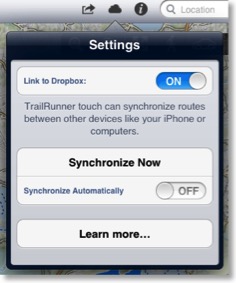
TrailRunner touch uses dropbox to make planned routes available to your linked iPhone or computers.
RaceBunny for iPhone can display routes planned in TrailRunner touch. If you go out for a hiking trip you can place one or more routes as a background route on your map. While you are walking, you see where you are and where you possibly should be.
To use route synchronization with RaceBunny for iPhone follow these steps
- Create a route in TrailRunner touch
- Tap on Synchronize Now
- Start RaceBunny on your iPhone
- Go to Menu > Planned Routes
- Link with your Dropbox account
- Synchronize the routes
- Select a route and add it to the background routes
- Close settings
You now see your route as a background route in the map. Add more such routes if you like.
Additional notes
For the technically interested, TrailRunner touch stores cloud routes under
dropbox/Apps/TrailRunner/Routes